DocsPlatforms
Android Mirror (experimental)
See the phone screen next to the logs, view-only, when you ask for it.
Experimental:
Mirror works for its documented cases but is not verified on physical devices or in native terminals such as Warp. Sustained frame rate, latency and battery use are not measured. Expect rough edges.
Before you start
| For | You need |
|---|---|
| Text snapshots | A verified Android transport (a connected device and app) |
| Pixel video | The above, plus FFmpeg on PATH (or --ffmpeg PATH), a terminal that accepts Kitty graphics, and a window at least 80 by 21 |
| The demo | Nothing. It uses a synthetic screen. |
Steps
1. Try the demo. Plain --demo uses text mode. Add the Kitty renderer to see animated pixel output:
tapsift --demo --mirror-renderer kitty2. With a real device, select a device and app, wait for its log stream, then press m. Capture starts only when you press it.
tapsift --device emulator-5554 --app com.example.app --mirror-quality economy3. Control it.
| Key | Pixel video | Text snapshots |
|---|---|---|
| m | Open and start, or close and clear | Open one snapshot, or close |
| p | Retry if stopped | Refresh once |
| v | Stop, or restart motion | Start or stop sampling (at most 1 frame per second) |
| Ctrl+S | Freeze the frame and save a PNG | Save the displayed thumbnail |
4. Inspect problems. Press Ctrl+K and choose Inspect mirror status and failure reason to see why a stream paused or stopped.
What you should see
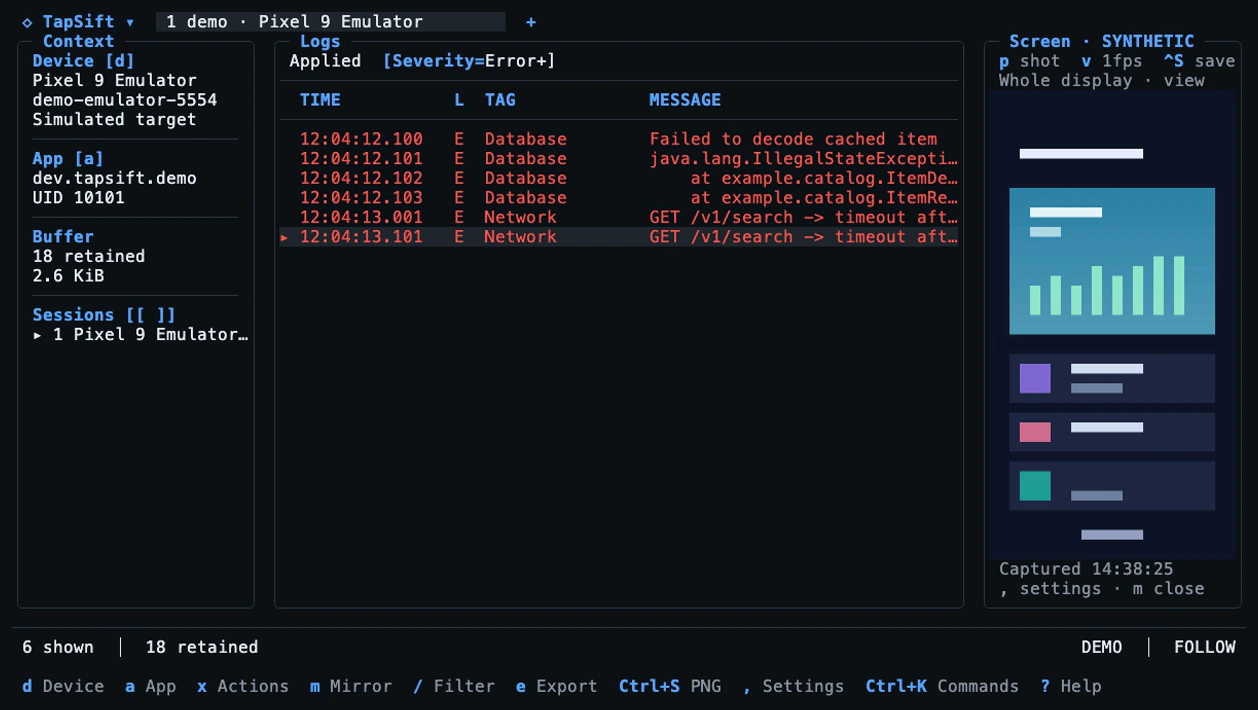
The workspace becomes Context | Logs | Mirror on windows 120 columns or wider. At 80 to 119 columns Context collapses to a compact source bar. Mirror takes at most 30% of the width and 50 columns. If the terminal never acknowledges the Kitty capability query within a second, TapSift shows an error. It does not quietly switch to a coarse thumbnail.
Options
| Option | Values |
|---|---|
--mirror-renderer | auto, kitty or text |
--mirror-quality | sharp (default, up to 720 by 1280, or 1280 by 720 landscape) or economy (up to 480 by 854) |
--ffmpeg PATH | FFmpeg to use for video |
Both qualities target 12 frames per second and keep the screen's aspect ratio. Change them under Settings (,) → Mirror. Settings → Layout puts the Mirror pane on the left or right.
Privacy
Warning:
Mirror shows the whole display, including other apps and notifications. App-scoped logging cannot scope pixels to your app.
- View-only: no touch or keyboard input is sent, no audio is captured, and it does not unlock devices.
- Frames stay in memory. They are not added to log history, exports or CLI JSON, and nothing is sent to an AI service.
- Saving a screenshot is an explicit action. See Exports.
- Real capture is disabled while the
TEA_TRACEenvironment variable is set, because tracing can save pixels.
Limits
- Android only. iOS Simulator, offline files and saved sessions cannot start Mirror.
- Each video segment is limited to 180 seconds. A clean segment renews on its own. After an unexpected end, press p.
- Rotation during a recording needs a restart.
- Only the visible tab runs Mirror. A dialog, a tab switch or a window below the minimum suspends it, and it can resume.
- tmux, SSH and other multiplexers are not verified.